

Modern web apps feel “open” (any page can request anything), yet the browser is fundamentally a sandbox: it assumes the network is hostile, other tabs are hostile, and sometimes even your own dependencies are hostile. The browser security model is the set of rules that decides what your code is allowed to read, write, and execute—and it’s the hidden layer behind almost every “why is this request blocked?” moment.
This post focuses on the browser’s security & isolation layer and how to debug it in practice.
The mental model: “You can send, but you can’t always read”
A useful one-liner:
Browsers often allow cross-origin writes (send a request), but restrict cross-origin reads (access the response or sensitive state).
Why? Because attackers don’t need to stop you from sending requests—they need to stop malicious pages from stealing your data or executing untrusted code with your privileges.
To understand the model, we’ll connect five pieces:
Same-Origin Policy (SOP): the default isolation boundary
Cross-Origin Resource Sharing (CORS): a controlled “exception” for network reads
Cookies: ambient identity that rides along with requests
Storage: where state lives (and what Cross Site Scripting (XSS) can steal)
Content Security Policy (CSP): how the server tells the browser what code/resources are allowed
1) Same-Origin Policy (SOP): where the boundary really is
1.1 What counts as “same origin”?
An origin is:
scheme (e.g.
https)host (e.g.
api.example.com)port (e.g.
443)
So these are different origins:
https://example.comvshttp://example.com(scheme differs)https://example.comvshttps://api.example.com(host differs)https://example.comvshttps://example.com:8443(port differs)
1.2 What SOP protects
SOP prevents a page from directly accessing another origin’s sensitive things, especially:
DOM access:
iframe.contentWindow.documentis blocked across originsNetwork read access:
fetch()may be allowed to send, but reading the response is restricted unless permitted (that’s where CORS comes in)Storage access:
localStorage,IndexedDB, etc. are per-originPowerful APIs: many capabilities are origin-scoped or permission-gated
1.3 The key nuance: “Send is usually allowed”
A malicious page can often trigger requests via:
<img src="https://bank.com/transfer?..."><form action="https://bank.com/transfer" method="POST">fetch("https://bank.com/private")
But SOP blocks the attacker from reading the response content (and modern cookie rules can also reduce whether cookies are sent).
1.4 Iframes: “I can embed you, but not inspect you”
Cross-origin iframes can load, but DOM access is blocked. Communication must use postMessagewith strict origin checks, or server-controlled embedding rules (we’ll revisit under CSP: frame-ancestors).
2) CORS in practice: what it blocks, what it allows, what people confuse
2.1 What CORS actually does
CORS is a browser enforcement mechanism driven by server opt-in.
The server sends headers saying who can read.
The browser decides whether your JS can access the response.
If you call the API from curl/Postman, CORS doesn’t apply—because CORS is about protecting browsers, not servers.
2.2 Simple request vs preflight
Some cross-origin requests trigger a preflight (an OPTIONSrequest) before the real request is sent.
Common preflight triggers:
Non-simple methods:
PUT,PATCH,DELETENon-simple headers:
Authorization, custom headersNon-simple
Content-Type: e.g.application/json(often causes preflight)
Preflight flow (high-level)
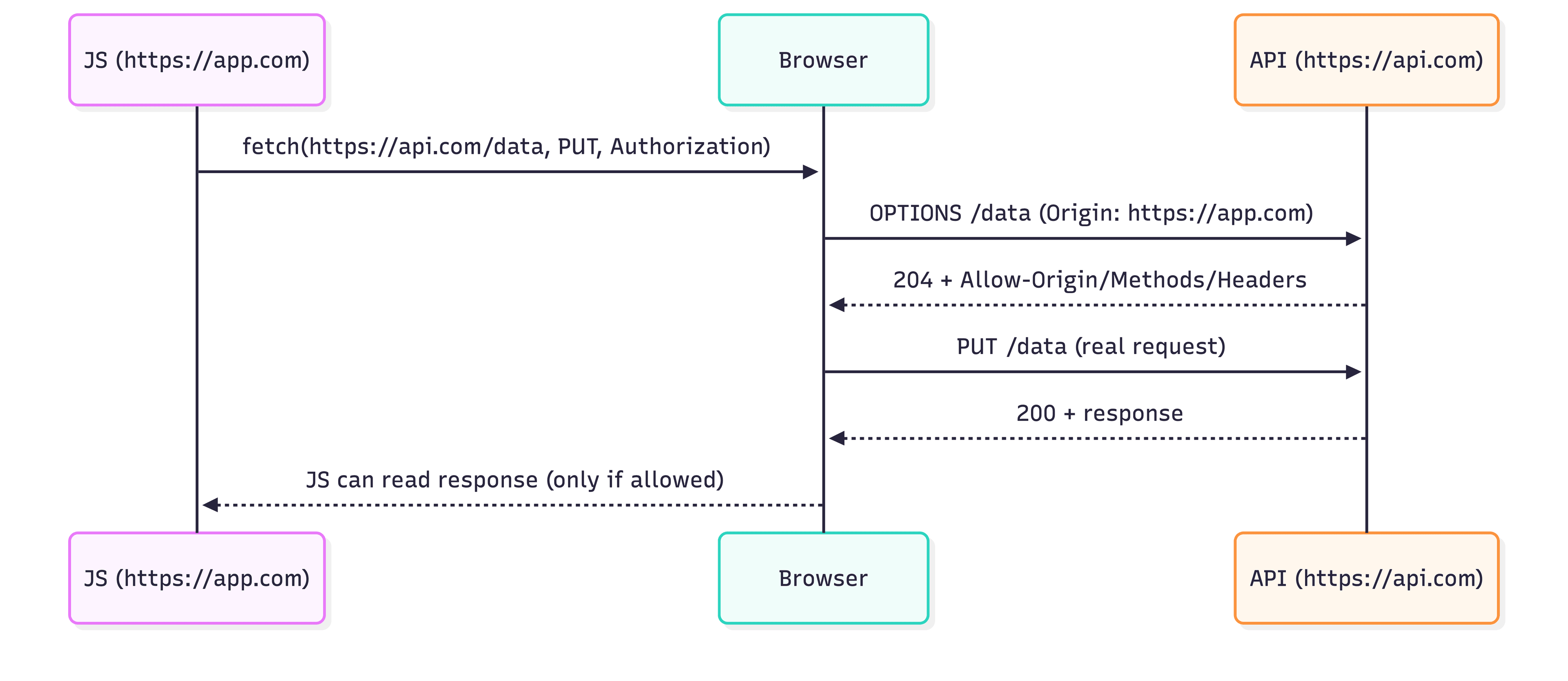
Preflight flow
2.3 The CORS headers you actually need
On the actual API response (GET/POST/etc.)
Access-Control-Allow-Origin: https://app.example.comAccess-Control-Allow-Credentials: true(only if using cookies)Access-Control-Expose-Headers: X-Request-Id(only if you need to read custom headers in JS)
On the preflight (OPTIONS) response
Access-Control-Allow-Origin: https://app.example.comAccess-Control-Allow-Methods: GET, POST, PUT, PATCH, DELETE, OPTIONSAccess-Control-Allow-Headers: Content-Type, Authorization, X-CSRF-TokenAccess-Control-Allow-Credentials: true(only if using cookies)Access-Control-Max-Age: 600(optional; reduces preflight frequency)
If you do cookie-based auth from another origin (e.g., SPA on app.com calling api.com), your frontend must also use:
fetch("https://api.com/me", { credentials: "include" })
and the server must return Access-Control-Allow-Credentials: true plus a non-wildcard Access-Control-Allow-Origin.
Next.js note (common confusion): if you’re using
Authorization: Bearer <jwt>and not cookies, you typically do not needcredentials: "include". That flag is primarily for cookies and browser-managed credentials.
2.4 Production Deep Dive: What CORS is actually blocking (pitfalls + fixes)
The same-origin boundary: what CORS changes (and what it doesn’t)
SOP is the default boundary: cross-origin reads are restricted.
CORS is the mechanism that lets a server opt in to cross-origin response access from browsers.
A good way to frame it for production debugging:
CORS problems show up when your JavaScript tries to read cross-origin responses.
Your server may still be receiving requests; the browser is the one enforcing “JS can’t see it”.
The 5 most common production pitfalls (and how to fix them)
Pitfall A: credentials: "include" + Access-Control-Allow-Origin: *
Credentialed requests (cookies / HTTP auth) can’t use wildcard origins.
Fix: echo the concrete origin, e.g. https://app.example.com.
Pitfall B: Preflight (OPTIONS) fails, so the real request is never sent
Common triggers: Authorization, custom headers, JSON Content-Type, and non-simple methods.
Fix: ensure the OPTIONS route returns:
Access-Control-Allow-OriginAccess-Control-Allow-MethodsAccess-Control-Allow-HeadersAccess-Control-Allow-Credentials(if you use cookies)
Pitfall C: Multi-origin support without Vary: Origin (cache poisoning)
If you echo different origins but don’t set Vary: Origin, CDNs/proxies can cache the wrong CORS header and cause random failures.
Fix: add Vary: Origin and make sure the CDN cache key varies by Origin.
Pitfall D: Treating CORS as authentication/authorization CORS only governs whether the browser exposes responses to JS. Fix: keep real auth on the backend (JWT/session/ACL), independent from CORS.
Pitfall E: Too many cross-origin setups in dev → surprises in prod
Fix: use a same-origin reverse proxy in development (Next.js rewrites / dev proxy / Nginx) so the browser always calls /api/*. Only rely on CORS when you truly need cross-site behavior (separate domains, embedded iframes, SSO).
3) Cookies: SameSite / HttpOnly / Secure (and real-world tradeoffs)
Cookies are ambient identity: the browser attaches them automatically when rules match. That’s great for sessions, but it’s exactly why Cross-Site Request Forgery (CSRF) exists.
3.1 Cookie attributes that matter in production
HttpOnly: JS cannot read the cookie (best practice for session cookies)
Secure: only sent over HTTPS (mandatory in production)
SameSite: controls cross-site sending (CSRF defense-in-depth)
Lax (common default): generally sent on top-level navigations, blocked on many cross-site subrequests
Strict: strongest, can break some login/redirect flows
None: allows cross-site usage, must be
Secure
Domain / Path: scope rules (e.g.
Domain=.example.comshares across subdomains;__Host-prefix can prevent risky scoping)Max-Age / Expires: session vs persistent
3.2 Cookie session vs JWT: practical guidance
Cookie session (HttpOnly)
✅ Harder to steal via XSS (can’t read cookie)
❌ Needs CSRF defenses (because cookies auto-attach)
JWT in localStorage
✅ No CSRF (not auto-attached)
❌ XSS can steal it instantly
✅/❌ Often used, but you must invest in XSS prevention (CSP, sanitization, dependency hygiene)
A very common production pattern:
Access token in memory
Refresh token in HttpOnly cookie
Strong CSP + tight sanitization
3.3 Callout: Origin vs Site (SameSite is about “site”, not “origin”)
Origin = scheme + host + port (used by SOP/CORS)
Site (schemeful site) ≈ registrable domain + scheme (used by SameSite)
Example:
https://app.example.com→https://api.example.comCross-origin (host differs) → CORS applies
Usually same-site (same registrable domain
example.com) →SameSite=Laxcookies are eligible
But fetch() defaults to credentials: "same-origin", meaning cookies are not sent to a different origin, even if it’s the same site.
So for app.example.com → api.example.com cookie auth, you still need:
fetch("https://api.example.com/me", { credentials: "include" })
3.4 Why cookies are linked to CSRF
Because cookies are attached automatically, CSRF is possible unless you add extra verification on state-changing requests.
Typical mitigations:
Use
SameSite=Lax(orStrict) for session cookiesAdd a CSRF token (double submit or server-side validation)
Require
Origin/Referervalidation for state-changing requests
3.5 CSRF: what it is, and how to stop it (cookie auth)
Attack idea: attacker makes your browser send a request with your cookies.
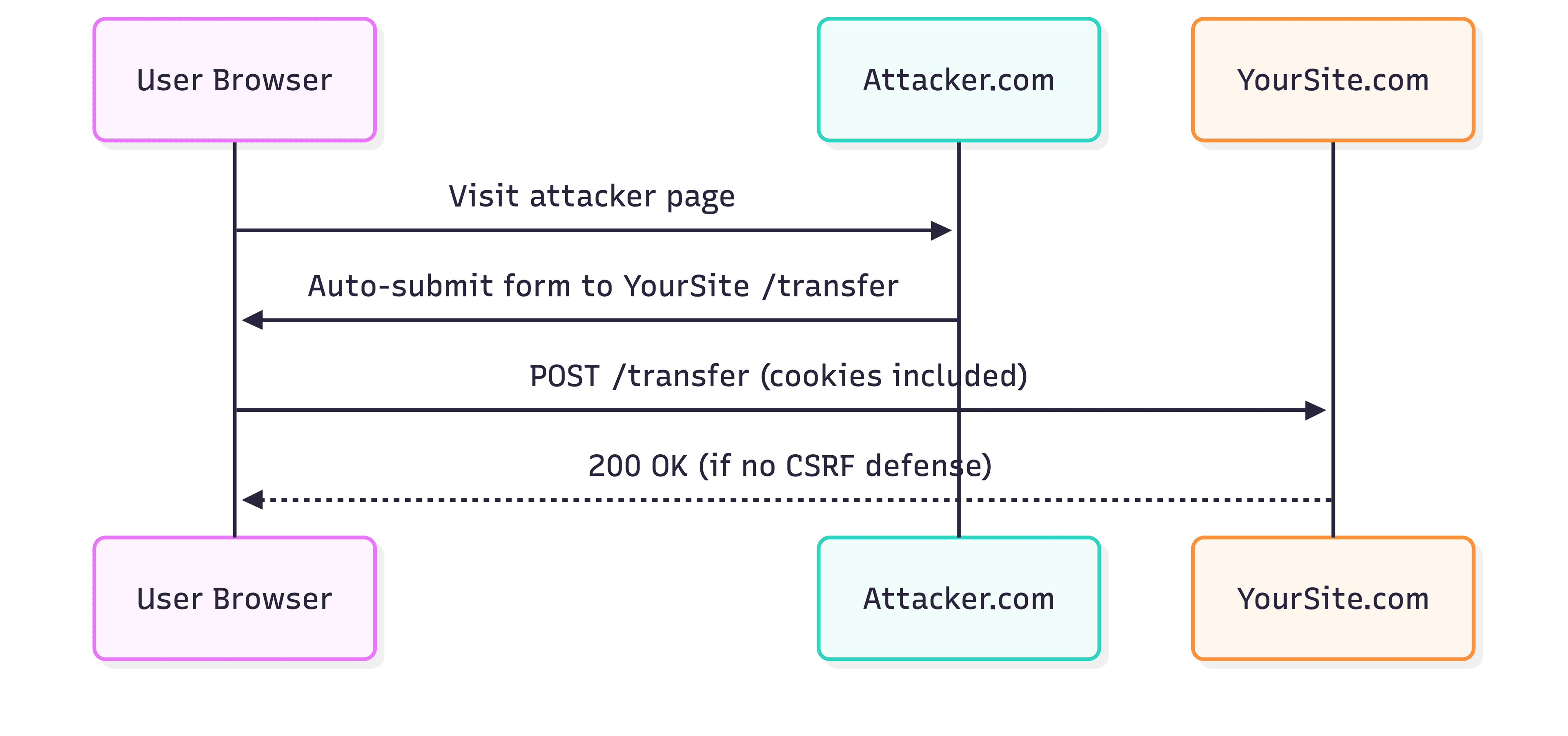
CSRF
Production CSRF checklist
SameSite=LaxorStrictfor session cookies (defense-in-depth)CSRF token for state-changing requests (
POST/PUT/PATCH/DELETE)Validate
Origin(and/orReferer) on writesConsider requiring a custom header on writes (forces preflight + blocks form-based CSRF)
Real-world edge cases
OAuth login redirects: too-strict SameSite can break callback flows; test this early.
Embedded iframes / third-party contexts: cookie rules are stricter; often require
SameSite=None; Secureplus careful threat modeling.
3.6 Production Deep Dive: Choosing SameSite / HttpOnly / Secure
Decision rule: what threat are you optimizing for?
If you’re most worried about token theft via XSS, prefer HttpOnly cookies for session/refresh tokens.
If you’re most worried about CSRF, prefer non-cookie bearer tokens (or keep cookies but implement strong CSRF protections).
Modern browser behavior to keep in mind
Cookies without an explicit SameSite are often treated as Lax by default in modern browsers.
Cross-site and embedded scenarios (SSO, iframes, third-party contexts) are subject to evolving browser rules. If your product depends on those flows, treat it as a continuous compatibility risk (test + monitor).
Production non-negotiables
Secure cookies require HTTPS; enforce HTTPS everywhere in production.
HttpOnly is the default for session cookies unless you have a strong reason not to.
Two mainstream production setups
Option A: Cookie session (most web apps)
HttpOnly; Secure; SameSite=Laxis a strong defaultAdd CSRF protections for state-changing requests:
CSRF token
Validate
Origin/Refereron writesConsider requiring a custom header on writes (blocks form-based CSRF)
Option B: Bearer token (APIs/mobile, sometimes SPAs)
Mostly avoids CSRF (no ambient cookies)
Treat token storage and rotation as first-class:
short-lived access token
refresh strategy (HttpOnly refresh cookie or rotation)
strong XSS defenses (CSP + safe rendering + dependency hygiene)
Interview-ready one-liner
Cookies reduce XSS token theft with HttpOnly, but require CSRF defenses; bearer tokens reduce CSRF, but make XSS and token storage/rotation the core risk.
4) Storage: localStorage vs sessionStorage vs IndexedDB (what to use, what NOT to store)
Start with this production truth:
If JS can read it, XSS can steal it.
So don’t store long-lived secrets in JS-readable storage.
4.1 Quick decision matrix
localStorage
✅ Persistent, simple
❌ Synchronous API (can block the main thread)
❌ XSS-readable → don’t store tokens
sessionStorage
✅ Per-tab lifetime (useful for “wizard state”, temporary drafts)
❌ XSS-readable
IndexedDB
✅ Large, structured, async
✅ Offline caches, search indexes, media blobs
❌ More complex (schema/versioning)
❌ Still XSS-readable
Cache Storage (Service Worker)
✅ Great for offline + performance caching of HTTP responses
❌ Must design cache invalidation and avoid caching sensitive responses incorrectly
4.2 Production patterns that work
Store non-sensitive UI state in local/session storage (filters, last visited tab, draft IDs)
Store cacheable data in IndexedDB (documents, offline lists) with clear expiry/versioning
Keep auth secrets in HttpOnly cookies or memory + rotation, not localStorage
4.3 Interview angle
If asked “Where do you store tokens?”, don’t answer with a single place. Answer with:
your threat model (XSS vs CSRF)
your app type (web vs mobile)
your mitigation stack (CSP, CSRF tokens, refresh rotation)
4.4 Production Deep Dive: Storage tradeoffs
Production rule: if JS can read it, XSS can steal it. This is why you should not store long-lived auth secrets in:
localStoragesessionStorageIndexedDB
What each storage is good for (practical patterns)
localStorage
Use for: non-sensitive preferences, UI state, feature flags, “last selected tab”
Avoid for: tokens, secrets, anything you wouldn’t want leaked
Watch for: synchronous API → big writes can jank the UI
sessionStorage
Use for: short-lived workflow state (onboarding, wizards, one-time flows)
Avoid for: secrets (still XSS-readable)
IndexedDB
Use for: offline caches, large datasets, search indexes, media blobs, document caches
Treat as: a cache of data you can recover, not a vault for secrets
Watch for: schema versioning + migrations (plan this early)
Recommended baseline
Identity secrets: HttpOnly cookies / server-side sessions / in-memory access tokens with rotation
Frontend storage: non-sensitive state + cacheable/rebuildable data
5) CSP: turning XSS from “game over” into “hard mode”
Content Security Policy (CSP) is a response header that tells the browser:
where scripts/styles/images can load from
whether inline scripts are allowed
whether the page can be embedded in an iframe
where
fetch/XHR/WebSocket connections can go (connect-src)
CSP is one of the most effective defenses against XSS, especially when you use nonces or hashes.
5.1 A realistic CSP starter (example)
(You’d adapt to your CDN, analytics, etc.)
Content-Security-Policy:
  default-src 'self';
  script-src 'self' 'nonce-<RANDOM_NONCE>';
  style-src 'self' 'unsafe-inline';
  img-src 'self' data:;
  connect-src 'self' https://api.example.com;
  frame-ancestors 'none';
  base-uri 'self';
  object-src 'none';
Key directives to remember
script-src: biggest XSS lever (prefer nonce/hash, avoidunsafe-inline)connect-src: controlsfetch/ XHR / WebSocket endpointsframe-ancestors: clickjacking defense (who can embed you)object-src 'none': blocks legacy plugin vectorsreport-to/report-uri: collect violation reports (great for rollout)
Tip: Start with
Content-Security-Policy-Report-Onlyto observe breakage without blocking.
5.2 Rollout plan (how you actually ship CSP)
Deploy Report-Only first
Collect violations, fix sources/inline usage
Add nonces/hashes, reduce
unsafe-inlineEnforce CSP
5.3 CSP does not replace input/output hygiene
CSP is powerful, but you still need:
output encoding / safe templating
avoid unsafe
innerHTMLfor untrusted contentdependency hygiene (supply chain is a common XSS vector)
5.4 Production Deep Dive: CSP that you can actually ship
The goal: reduce XSS blast radius.
CSP works best when it makes injected script execution difficult:
prefer nonce/hash-based script allowlisting
avoid relying on
unsafe-inlinelong term
A deployable rollout process
Start with Report-Only
Collect violations and classify them:
missing allowlists for legitimate third-party resources
leftover inline scripts/styles
unexpected connections blocked by
connect-src
Introduce nonces/hashes and remove inline scripts where possible
Enforce CSP gradually (feature flags or staged rollout if needed)
Production pitfalls
Setting a nonce but accidentally allowing attacker-controlled scripts to inherit it (nonce must be per-response and applied only to trusted scripts)
Forgetting
connect-srcfor analytics / APIs / WebSocket endpoints → “works locally, breaks in prod”Not setting
frame-ancestors→ clickjacking exposure
Minimal “security wins” list
script-srcwith nonce/hash (core)object-src 'none'base-uri 'self'frame-ancestorsrestrictedconnect-srcexplicitly listed (APIs, WS, analytics)
Interview-ready one-liner
CSP isn’t just a header; you ship it safely via Report-Only → fix violations → nonce/hash scripts → enforce, and
script-srcis the core lever.
6) Putting it together: the “real app” matrix
Option A: Cookie-based sessions (common for web apps)
Pros: works well with HttpOnly; better against token theft via XSS
Cons: must handle CSRF; cross-origin SPA-to-API needs CORS + credentials
Recommended shape:
Session cookie:
HttpOnly; Secure; SameSite=LaxAPI:
Requires CSRF token for
POST/PUT/PATCH/DELETEValidates
Originheader
CORS:
Allow only your app origin
Access-Control-Allow-Credentials: true
Option B: Bearer tokens in Authorization header (common for pure APIs)
Pros: no ambient cookies → CSRF much less likely
Cons: token storage becomes your problem (XSS risk if stored in JS-readable places)
Typical shape:
Short-lived access token in memory
Refresh token via HttpOnly cookie or rotated refresh tokens carefully managed
Strict CSP to reduce XSS risk
7) What breaks in practice (and how to debug fast)
7.1 “CORS error” in console
Symptoms
Console shows CORS blocked
Network panel may show request succeeded but JS can’t read
Checklist
Confirm
Originrequest header is what you expectCheck preflight
OPTIONSresponse headers:Access-Control-Allow-Originmatches the exact originAccess-Control-Allow-Headersincludes what you sendAccess-Control-Allow-Methodsincludes your method
If using cookies:
Frontend uses
credentials: "include"Server includes
Access-Control-Allow-Credentials: trueAllow-Originis not*
7.2 “Cookie not set / not sent”
Symptoms
Set-Cookieexists but cookie doesn’t appear in the Application tabCookie appears but isn’t sent on requests
Checklist
Is the response over HTTPS? (Secure cookies won’t set over HTTP)
If
SameSite=None, did you also setSecure?Is cookie domain/path correct?
Are you crossing sites/origins where SameSite blocks sending?
7.3 “CSP blocked script / connect-src violation”
Symptoms
Console: “Refused to load…” or “violates Content Security Policy”
Your app works locally but breaks in prod/CDN
Checklist
Look at the blocked URL and the directive (
script-src,connect-src, etc.)If you use inline scripts, adopt nonce/hash rather than
unsafe-inlineStart with Report-Only to iterate safely
7.4 A practical baseline (what I ship by default)
HTTPS everywhere
Session cookie:
HttpOnly; Secure; SameSite=LaxCSRF protection for state-changing cookie-auth endpoints
Avoid storing long-lived secrets in
localStorageCSP with at least:
default-src 'self', strictscript-src, correctconnect-src, andframe-ancestorsKeep CORS tight: allow specific origins only, avoid
*for anything sensitive
7.5 Appendix: a tiny “cheat sheet” table
Layer | What it controls | Typical error message |
SOP | DOM + storage + “read access” boundaries | “Blocked a frame…” / opaque response |
CORS | Whether JS can read cross-origin responses | “has been blocked by CORS policy” |
Cookies | Ambient auth + CSRF surface | SameSite warnings / missing cookie |
Storage | JS-readable state (XSS target) | Not an error—becomes a breach |
CSP | What code/resources may run/load | “Refused to load… violates Content Security Policy” |
8) Tech interview Q&A
SOP vs CORS—what’s the difference? SOP is the default isolation boundary. CORS is a controlled exception for reading cross-origin network responses (server opts in via response headers; the browser enforces it).
Why does cross-origin fetch with cookies need special configuration? Frontend needs
credentials: "include". Backend must returnAccess-Control-Allow-Credentials: true, andAccess-Control-Allow-Origincannot be*.Does an HttpOnly cookie prevent XSS? It prevents direct cookie reads, but XSS can still send requests as the user (session riding). You still need XSS defenses (CSP + safe rendering + dependency hygiene).
Does
SameSite=Laxfully stop CSRF? No. OWASP treats SameSite as defense-in-depth; CSRF tokens remain the more robust general solution.Which CSP directive prevents clickjacking?
frame-ancestors.Where is the safest place for JWT? There’s no absolute answer. Common production tradeoffs:
Web: HttpOnly cookie + CSRF defenses
Mobile/API:
Authorizationheader + token rotation + strong XSS defenses (for web clients)
References
Same-Origin Policy and CORS
https://developer.mozilla.org/en-US/docs/Web/Security/Defenses/Same-origin_policy
https://developer.mozilla.org/en-US/docs/Web/HTTP/Guides/CORS
https://developer.mozilla.org/en-US/docs/Glossary/Preflight_request
https://developer.mozilla.org/en-US/docs/Web/HTTP/Methods/OPTIONS
https://developer.mozilla.org/en-US/docs/Web/HTTP/Headers/Access-Control-Allow-Origin
https://developer.mozilla.org/en-US/docs/Web/HTTP/Headers/Access-Control-Allow-Credentials
https://developer.mozilla.org/en-US/docs/Web/HTTP/Headers/Access-Control-Allow-Headers
https://developer.mozilla.org/en-US/docs/Web/HTTP/CORS/Errors/CORSNotSupportingCredentials
https://developer.mozilla.org/en-US/docs/Web/Security/Practical_implementation_guides/CORS
Cookies, SameSite, CSRF
https://developer.mozilla.org/en-US/docs/Web/HTTP/Headers/Set-Cookie
https://developer.mozilla.org/en-US/docs/Web/Security/Practical_implementation_guides/Cookies
https://www.reuters.com/technology/google-scraps-plan-remove-cookies-chrome-2024-07-22/
Storage (localStorage / sessionStorage / IndexedDB)
https://developer.mozilla.org/en-US/docs/Web/API/Web_Storage_API
https://developer.mozilla.org/en-US/docs/Web/API/Web_Storage_API/Using_the_Web_Storage_API
https://developer.mozilla.org/en-US/docs/Web/API/IndexedDB_API
https://developer.mozilla.org/en-US/docs/Web/API/IndexedDB_API/Using_IndexedDB
CSP and XSS
https://developer.mozilla.org/en-US/docs/Web/HTTP/Headers/Content-Security-Policy
https://developer.mozilla.org/en-US/docs/Web/HTTP/Headers/Content-Security-Policy/script-src
https://developer.mozilla.org/en-US/docs/Web/HTTP/Headers/Content-Security-Policy/frame-ancestors
https://cheatsheetseries.owasp.org/cheatsheets/Content_Security_Policy_Cheat_Sheet.html
https://cheatsheetseries.owasp.org/cheatsheets/Cross_Site_Scripting_Prevention_Cheat_Sheet.html