

In real production systems, a huge share of performance issues, outages, and even security incidents get stuck somewhere along this chain — DNS jitter (DNS lookup latency variance), TLS misconfiguration, CDN caching mistakes, HTTP/2 head-of-line blocking, and the trade-offs of HTTP/3/QUIC.
When you type a URL or your frontend calls fetch()to hit a backend API, the browser is doing the same core job:
Find the server — Domain Name System (DNS)
Establish a transport — Transmission Control Protocol (TCP) or QUIC (Quick UDP Internet Connections)
Secure it — Transport Layer Security (TLS)
Speak HTTP — Hypertext Transfer Protocol (HTTP) (HTTP/1.1, HTTP/2, HTTP/3)
Maybe go through an edge — Content Delivery Network (CDN) / Edge
Reach the origin — your backend service
Bring bytes back — then the browser turns them into a page (HTML/CSS/JS) or data (JSON)
This post explains the full chain, how to measure each step, and a practical map of symptoms → detection → fixes.
0) Before the network: “Do I even need to go online?”
Before DNS/TLS/anything, the browser checks whether it can satisfy the request without a trip:
HTTP cache (fresh cached responses, revalidation via Entity Tag (ETag) / Last-Modified, etc.)
Service Worker (SW) (can intercept
fetch()and serve cached responses;fetchintegrates with SW + Cross-Origin Resource Sharing (CORS))Connection reuse: even if you must go online, you might not need a new connection (HTTP/2 and HTTP/3 can carry many requests on one connection)
If you take one thing away: caching often beats micro-optimizations.
1) DNS: turning a hostname into an Internet Protocol (IP) address
1.1 What happens
When the browser needs to reach api.example.com, it must resolve the hostname to an IP address (A/AAAA records). DNS lookups are usually once per hostname per page load — but every unique hostname costs you one.
Resolution is typically:
browser/OS cache → (maybe) router cache → recursive resolver → authoritative DNS.
1.2 Why it matters
DNS latency is pure overhead: no bytes from your server move until DNS completes. You can see this via timing APIs (e.g., domainLookupStart/ domainLookupEnd).
1.3 Practical optimization knobs
Warm DNS early:
<link rel="dns-prefetch" href="//api.example.com" />
And minimize unnecessary hostnames (fonts/images/analytics spread across many domains can add up).
2) Transport: TCP (HTTP/1.1, HTTP/2) vs QUIC (HTTP/3)
Once the browser has an IP, it must establish a transport path.
2.1 TCP (Transmission Control Protocol) — classic
TCP uses the 3-way handshake:SYN → SYN/ACK → ACK. Only after TCP is established can TLS start (for HTTPS).
2.2 QUIC (Quick UDP Internet Connections) — for HTTP/3
HTTP/3 runs over QUIC, a transport built on User Datagram Protocol (UDP) that provides connection semantics (streams, reliability, congestion control) at the QUIC layer.
QUIC also supports features TCP can’t do nicely (like connection migration when networks change), by design.
2.3 Key intuition
HTTP/2 rides on TCP, so packet loss can cause head-of-line (HOL) blocking at the TCP layer.
HTTP/3 rides on QUIC, which avoids TCP’s connection-level HOL blocking by using independent streams.
3) TLS: encryption + identity + protocol negotiation (ALPN)
Most production traffic is HTTPS (Hypertext Transfer Protocol Secure), so the TLS (Transport Layer Security) handshake is next.
TLS does three big jobs:
Encrypt the channel (confidentiality/integrity)
Authenticate the server (certificates)
Negotiate details (ciphers, and importantly: which HTTP version to use)
3.1 TLS 1.3 basics
TLS 1.3 is the modern baseline and reduces handshake round trips compared to earlier versions; most guidance recommends supporting and preferring TLS 1.3.
3.2 SNI (Server Name Indication): “which hostname are you?”
Many servers host multiple domains on one IP. SNI lets the client tell the server which hostname it wants during the TLS handshake, so the server can present the right certificate.
3.3 ALPN (Application-Layer Protocol Negotiation): “let’s use HTTP/2”
ALPN is the TLS extension that negotiates the application protocol (e.g., h2 for HTTP/2).
For HTTP/3, the story is slightly different: HTTP/3 is mapped over QUIC, and QUIC is secured using TLS 1.3 mechanisms as specified for QUIC.
4) HTTP/1.1 vs HTTP/2 vs HTTP/3 (what changes after you’re connected)
HTTP semantics (methods, status codes, headers) are shared across versions. What changes is framing, multiplexing, and transport behavior.
4.1 HTTP/2 (RFC 9113)
HTTP/2 introduces:
Binary framing
Multiplexing
Header compression
…enabling multiple concurrent exchanges on a single connection.
4.2 HTTP/3 (RFC 9114)
HTTP/3 maps HTTP semantics over QUIC and keeps the “many streams at once” model, but avoids TCP’s connection-level HOL blocking issues on lossy links.
4.3 In real browsers: how does HTTP/3 get picked?
Browsers typically need a signal that HTTP/3 is available (commonly via Alt-Svc (HTTP Alternative Services)).
So you can see:
First visit: HTTPS over HTTP/2
Later visits: upgraded to HTTP/3 after discovery
5) CDN / Edge: the “middle layer” you feel but don’t see
A CDN (Content Delivery Network) is a geographically distributed set of servers that cache content closer to users.
In practice, your request flow often becomes:
Browser → Edge (CDN) → Origin (your backend)
At the edge:
Cache HIT: edge replies immediately (fast, origin untouched)
Cache MISS: edge forwards to origin, caches the response (depending on headers/rules)
Caching behavior is heavily influenced by HTTP caching directives.
6) Origin: your actual backend (load balancer → app → database)
“Origin” is the server that ultimately processes requests (your API/service). The path may include:
Layer 7 reverse proxy / load balancer
app servers (Node/FastAPI/etc.)
downstream calls (database, cache, other services)
From a frontend perspective, the critical output is:
Time To First Byte (TTFB) — how long until the first response byte arrives
response size and streaming behavior
cacheability headers
7) What the waterfall really means: DNS / Connect / SSL / TTFB
7.1 Chrome DevTools
In Chrome DevTools → Network, the Waterfall shows request phases and their timing relationships.
7.2 Performance APIs (Resource Timing / Navigation Timing)
You can measure pieces of the network path via Navigation Timing / Resource Timing (DNS time, TCP time, etc.). Useful markers:
domainLookupStart/domainLookupEnd(DNS)connectStart/connectEnd(connection establishment)secureConnectionStart(TLS handshake start)
8) Zoom in: what happens when you call fetch()?
Example:
await fetch("https://api.example.com/leads?status=active", {
  method: "GET",
  headers: { Accept: "application/json" },
});
The browser’s decision tree (high level):
Service Worker intercept? (if registered and controlling the page)
HTTP cache usable? (fresh, or needs revalidation)
If network needed:
DNS if needed
Reuse an existing connection if possible (common with HTTP/2/3)
Otherwise create a new TCP+TLS connection (or QUIC+TLS for HTTP/3)
Send the HTTP request, receive response bytes, resolve the promise
Cross-origin? You might pay a “preflight tax”
If you call an API on a different origin and your request isn’t “simple”, the browser may send a CORS preflight request (an OPTIONS request) first. That’s an extra round trip before your real request even starts—often a hidden reason APIs feel “slow”.
9) Performance levers that actually move the needle
9.1 Reduce connection setup cost
Use
preconnectfor critical third-party/API origins (DNS + TCP + TLS warmup)Avoid unnecessary hostnames (each can add DNS + handshake overhead)
<link rel="preconnect" href="https://api.example.com" crossorigin />
9.2 Use modern protocols
Enable HTTP/2 (and HTTP/3 where it makes sense)
Ensure ALPN is correctly configured so clients can negotiate HTTP/2
9.3 Cache aggressively, but correctly
Static assets: long-lived cache + content hashing
APIs: cache where safe, revalidate where needed (ETag), and use CDN caching rules when appropriate
9.4 Kill hidden round trips
Avoid unnecessary CORS preflights (or cache preflight results with correct headers), and keep cross-origin design intentional
10) Real-world issues that get stuck on this chain (and how to debug them)
This section is a practical symptom → detection → fix map for the most common “it feels slow / flaky / broken” problems in this network chain.
10.1 DNS jitter (DNS lookup latency variance)
What it is DNS lookup time fluctuates a lot (fast sometimes, slow other times), so your API calls feel randomly sluggish.
What it looks like
DevTools Waterfall: DNS slice spikes on some loads but not others.
Field monitoring: p95/p99 DNS time high, while average looks “fine”.
How to detect
Use Navigation Timing / Resource Timing: compare
domainLookupEnd - domainLookupStartacross many samples.Check correlation with:
specific hostnames,
specific networks (mobile/corporate DNS),
or region.
How to fix
Reduce number of hostnames (fewer DNS lookups).
Warm up critical origins:
dns-prefetchandpreconnect(use sparingly).Improve DNS reliability (provider/resolver strategy).
Reuse connections (DNS cost disappears if you don’t reconnect often).
10.2 TLS handshake slowness / misconfiguration
What it is TLS is encryption + identity verification + protocol negotiation. If the handshake is slow or failing, everything waits.
What it looks like
DevTools Waterfall: large SSL slice.
Users see certificate errors, or requests fail in some environments.
How to detect
In DevTools timing: SSL time dominates connection setup.
If errors happen, check cert details: hostname mismatch, expired cert, broken chain.
How to fix
Prefer TLS 1.3 (when possible).
Keep certificate chain clean.
Reuse connections (HTTP/2/3) to avoid repeated handshakes.
10.3 CDN caching mistakes (too much cache / too little cache)
What it is CDN can make things blazing fast—or silently serve stale/incorrect responses if cache headers and cache keys are wrong.
What it looks like
“Why do I still see old content after deploy?”
“Why is origin still getting hammered?” (low cache hit ratio)
Worst case: “Why did a user see someone else’s data?” (dangerous: personalized content cached)
How to detect
Compare response headers across requests:
Cache-Control,ETag,VaryCDN cache status headers (HIT/MISS/BYPASS) if present
In DevTools: repeated loads still show full downloads instead of 304 / cached responses.
How to fix
Static assets: content hashing + long cache.
HTML entrypoint: short cache or revalidation.
APIs:
Cache only safe GET endpoints.
Use
s-maxagefor shared caches and considerstale-while-revalidate.Ensure cache key includes required variants (e.g., language), and never cache personalized content unless you really know what you’re doing.
10.4 HTTP/2 head-of-line blocking (TCP-level)
What it is HTTP/2 multiplexes many streams over one TCP connection. With packet loss, TCP delivery ordering can stall the whole connection (head-of-line blocking).
What it looks like
Random stalls, especially on lossy networks (mobile/Wi-Fi).
One “bad” connection makes many resources feel slow.
How to detect
DevTools Protocol shows
h2, and stalls aren’t explained by server time.Field data: tail latency (p95/p99) spikes on certain networks/regions.
How to fix
Reduce RTT exposure (edge closer to users).
Tune server/network stack where applicable.
Consider enabling HTTP/3 (QUIC) for supported clients.
10.5 HTTP/3 / QUIC trade-offs (it’s not free magic)
What it is HTTP/3 over QUIC can reduce TCP HOL pain, but adds operational realities: UDP might be blocked, client behavior differs, and discovery matters.
What it looks like
Some networks never use HTTP/3 (UDP blocked).
First load uses HTTP/2; later loads upgrade after discovery (Alt-Svc).
How to detect
DevTools Protocol column:
h3vsh2adoption.Confirm server/CDN is advertising Alt-Svc appropriately.
How to fix
Enable HTTP/3 where it helps, but keep HTTP/2 as a solid fallback.
Monitor adoption and failure rate by network/region.
Be explicit about discovery/advertising (Alt-Svc) and measure actual usage.
11) A concrete mental model (sequence diagram)
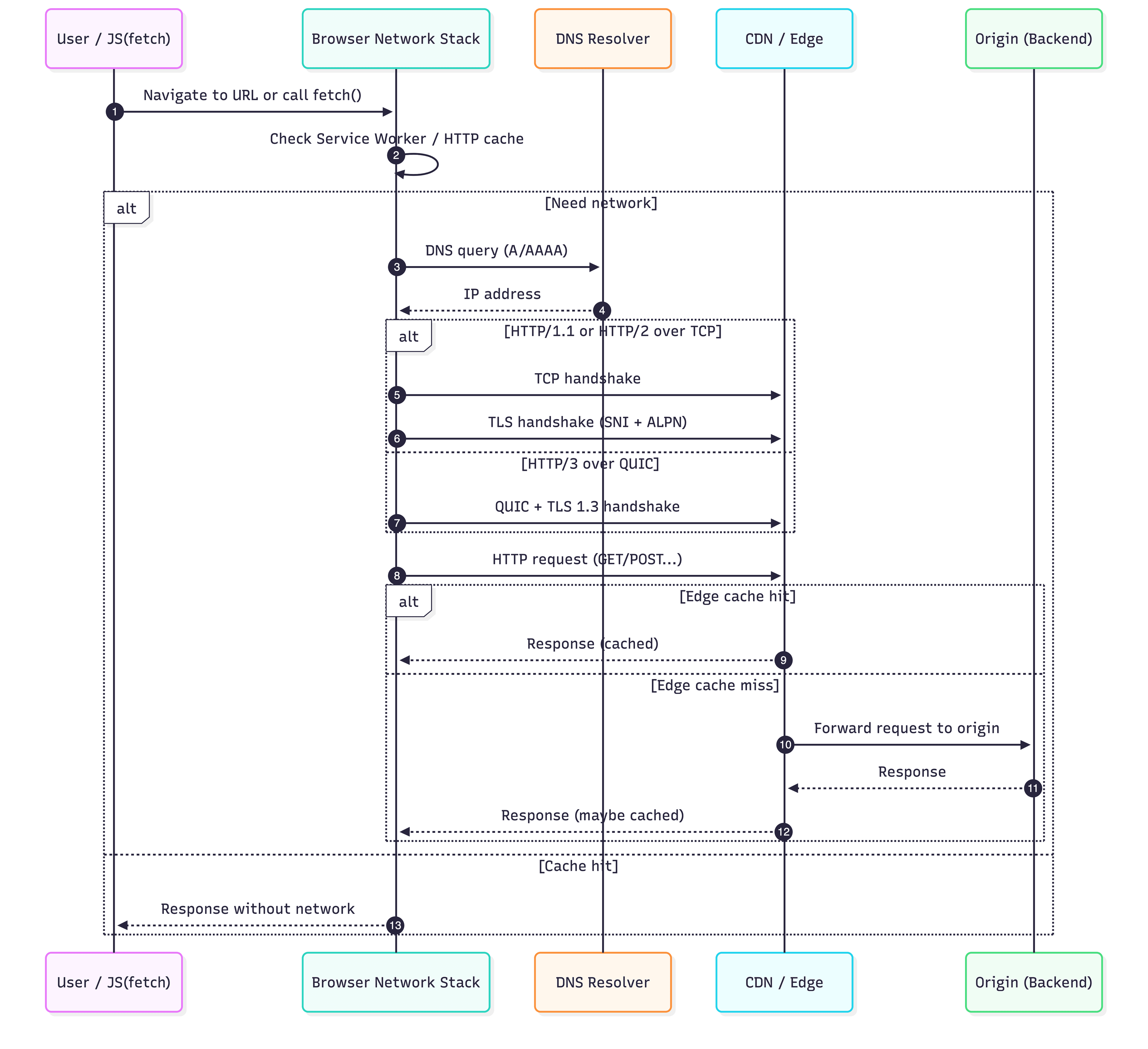
Mermaid Chart - Create complex, visual diagrams with text.-2026-01-25-225653
12) Debug checklist (what to look at when an API “feels slow”)
Is it Domain Name System (DNS)? Many hostnames? Slow resolver? (check timing APIs / waterfall DNS slice)
Is it handshake cost? New connections vs reused ones (look at Connect / SSL time)
Is it CORS preflight request? Hidden OPTIONS before the real call
Is it Time To First Byte (TTFB) at origin? Backend compute/database latency (waterfall “Waiting”)
Is caching working?
Cache-Control/ETagcorrect? Edge cache hit rate?Is protocol suboptimal? Falling back to HTTP/1.1 when HTTP/2 is expected (ALPN/cert/proxy config)
13) Performance metrics matrix (what to measure + what to do)
Metric (full name) | Where to see it | “Bad” usually means | Common causes | Typical fixes |
Round-Trip Time (RTT) | Synthetic monitor / OS network / DevTools (indirect) | High baseline latency | Users far away, mobile networks | Use edge/CDN closer to users, reduce round trips |
DNS time (Domain Name System time) | DevTools “DNS”; Resource Timing
| Host lookup overhead | Too many hostnames, slow resolver | Fewer origins, |
Connect time (TCP connect / QUIC connect) | DevTools “Initial connection” | New connections are expensive | No reuse, too many domains |
|
TLS time (Transport Layer Security handshake) | DevTools “SSL”;
| Handshake dominates | Cold connections, long RTT | Reuse connections, TLS 1.3, clean cert chain |
TTFB (Time To First Byte) | DevTools “Waiting”; RUM/APM | Origin is slow or far | Cold starts, slow DB, cache misses | Cache, optimize DB, warm capacity, edge caching |
Download time / payload size | DevTools “Content Download” | Too much data | Large JSON, no compression | Compress, paginate, reduce fields |
CDN cache hit ratio | CDN dashboard/logs | Too many origin hits | Bad cache headers/key | Fix Cache-Control, vary correctly, SWR |
Interview tip: Always connect metrics to “what knob would you turn next?”
14) Failure modes: what it looks like when this layer breaks
Layer | What you see | Likely root cause | How to confirm fast |
Domain Name System (DNS) | “Server IP address could not be found”; long “DNS” | Wrong record, resolver outage | Try different network; compare hostnames; see DNS timing |
Transport (TCP/QUIC) | Long “Initial connection”; intermittent stalls | Packet loss; UDP blocked (HTTP/3) | Check “Protocol” column; compare networks |
Transport Layer Security (TLS) | Cert errors; long “SSL” | Expired/misconfigured cert; SNI mismatch | View cert details; DevTools security panel |
HTTP version | Many connections; slow waterfalls | HTTP/1.1 fallback | DevTools “Protocol” shows |
CDN / Edge | Fast in one region, slow in another | Cache miss, routing issues | Look for cache status headers; compare regions |
Origin | High “Waiting (TTFB)” | Server compute/database slow | APM/logs; p95/p99 spikes; slow query logs |
CORS | Extra OPTIONS requests | Preflight triggered | DevTools shows OPTIONS + real call pair |
15) Interview section (appendix)
A 2-minute “walkthrough answer”
“When I type a URL or call
fetch(), the browser first checks Service Worker and HTTP cache. If it needs the network, it resolves Domain Name System (DNS) to an Internet Protocol (IP) address, then establishes a transport connection—Transmission Control Protocol (TCP) for HTTP/1.1 and HTTP/2, or QUIC (Quick UDP Internet Connections) for HTTP/3. Next it performs the Transport Layer Security (TLS) handshake for HTTPS, validating certificates and negotiating the protocol (via Application-Layer Protocol Negotiation (ALPN) for HTTP/2). The request may hit a Content Delivery Network (CDN) edge cache; on a hit it returns immediately, otherwise it forwards to the origin backend. The biggest performance levers are reducing connection setup costs, maximizing cache hit ratio for static assets and safe GETs, and keeping Time To First Byte (TTFB) low at the origin.”
System design prompts (CDN + caching + origin + security)
“Which API endpoints would you cache at the CDN, and how do you prevent leaking user data?”
“Design caching rules for a frequently-changing inventory list (TTL + ETag + stale-while-revalidate).”
“A marketing spike hits: where do you rate limit (edge vs origin), and how do you degrade gracefully?”
“Only NZ/AU users report slowness: how do you isolate DNS vs edge routing vs origin region?”
References
Browser + performance measurement
MDN — How browsers work: https://developer.mozilla.org/en-US/docs/Web/Performance/Guides/How_browsers_work
MDN — Navigation and resource timings: https://developer.mozilla.org/en-US/docs/Web/Performance/Guides/Navigation_and_resource_timings
web.dev — Navigation and Resource Timing: https://web.dev/articles/navigation-and-resource-timing
Chrome DevTools — Network features reference: https://developer.chrome.com/docs/devtools/network/reference
Fetch + CORS
MDN — Using the Fetch API: https://developer.mozilla.org/en-US/docs/Web/API/Fetch_API/Using_Fetch
MDN — CORS guide: https://developer.mozilla.org/en-US/docs/Web/HTTP/CORS
MDN — Preflight request (glossary): https://developer.mozilla.org/en-US/docs/Glossary/Preflight_request
DNS + connection warmup
MDN — dns-prefetch: https://developer.mozilla.org/en-US/docs/Web/Performance/Guides/dns-prefetch
MDN — rel="preconnect": https://developer.mozilla.org/en-US/docs/Web/HTML/Attributes/rel/preconnect
HTTP + TLS standards
RFC 9110 — HTTP Semantics: https://www.rfc-editor.org/rfc/rfc9110
RFC 9113 — HTTP/2: https://www.rfc-editor.org/rfc/rfc9113
RFC 9114 — HTTP/3: https://www.rfc-editor.org/rfc/rfc9114
RFC 9000 — QUIC transport: https://www.rfc-editor.org/rfc/rfc9000
RFC 9001 — Using TLS to Secure QUIC: https://www.rfc-editor.org/rfc/rfc9001
RFC 8446 — TLS 1.3: https://www.rfc-editor.org/rfc/rfc8446
RFC 6066 — TLS Extensions (SNI): https://www.rfc-editor.org/rfc/rfc6066
RFC 7301 — ALPN: https://www.rfc-editor.org/rfc/rfc7301
RFC 7838 — Alt-Svc: https://www.rfc-editor.org/rfc/rfc7838
CDN / caching
Cloudflare Learning Center — What is a CDN?: https://www.cloudflare.com/learning/cdn/what-is-a-cdn/
Cloudflare Docs — Cache: https://developers.cloudflare.com/cache/
MDN — HTTP caching: https://developer.mozilla.org/en-US/docs/Web/HTTP/Caching
(Optional glossary support)
MDN — Head-of-line blocking: https://developer.mozilla.org/en-US/docs/Glossary/Head_of_line_blocking
MDN — Alt-Svc header reference: https://developer.mozilla.org/en-US/docs/Web/HTTP/Headers/Alt-Svc